
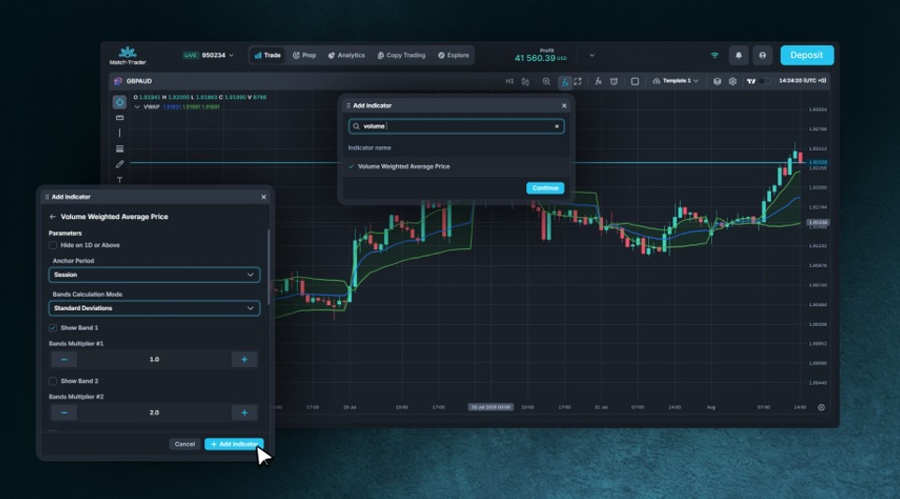
Match-Trade Technologies added 63 indicators to Match-Trader's built-in charting library today (Thursday). The release covers 49 technical indicators and 14 volume-based studies.
The release gives brokers a broader native charting package alongside Match-Trader's existing TradingView integration. Traders can configure the new studies on a chart and save multi-indicator setups as templates rather than rebuilding them for each instrument.
Match-Trade did not disclose how many indicators the native library contained before the update or its new total. It also supplied no adoption data showing how often traders leave Match-Trader for an external charting service.
VWAP, Money Flow and Pivot Points Join the Library
The highlighted additions include volume-weighted average price, or VWAP, which combines price and activity to provide an intraday reference level.
The Money Flow Index also joins the library. The oscillator uses price and volume to estimate buying and selling pressure on a scale from zero to 100.
Pivot Points Standard automatically plots a central pivot and related support and resistance levels. It is intended to replace the repeated manual drawing of intraday reference levels.
- Match-Trade Promotes Rafał Walencik to Head of Sales as Commercial Reshuffle Completes
- Match-Trade Consolidates Sales and Marketing Under New Commercial Chief Role, Appoints a Familiar Face
- Prediction Markets Push Deeper Into Prop Trading via Match-Trade Deal
The 14 volume-based indicators require an important qualification in retail FX and CFD markets. These markets do not provide one consolidated exchange -volume figure.
The studies instead use tick volume, a count of price or quote updates, as a proxy for activity. The reading can vary with the data feed and does not represent total market turnover.
Match-Trader's Indicator Templates arrived in June. That feature saves a collection of studies and their settings so the same configuration can be applied to another chart.
The indicator release follows a wider rebuild of Match-Trader's native charts. Match-Trade added drawing tools, pattern recognition and measurement functions in late 2025, part of a product sequence that FinanceMagnates.com covered in May.
TradingView, MT5 and cTrader Take Different Routes
The peer comparison depends on what counts as an indicator library. TradingView's embedded Advanced Charts documentation lists more than 100 built-in indicators.
Its public service advertises more than 400 built-in studies and strategies plus a much larger community library. Pine Script indicators, however, are not supported in the embedded charting libraries.
MetaTrader 5 takes the opposite approach. It ships with 38 technical indicators, fewer than Match-Trader added in this release alone.
Users can install or build additional studies through the MQL5 Market, Code Base and development tools. The bundled count is therefore a poor measure of the full analytical range available to an MT5 user.
cTrader also combines built-in and extensible tools. Its standard indicators work across web, mobile, Windows and Mac.
Custom studies can be created in C# or Python on desktop and distributed through the cTrader Store. Spotware added native Python support for indicators in cTrader 5.4 in 2025.
Other vendors are competing on workflow rather than study totals. Leverate made its native xChart the default engine across desktop and mobile this week.
xChart keeps orders on existing routing and risk controls. The release followed DXtrade's March update, which put mobile charts and order entry in one screen.
Match-Trader Keeps Native and TradingView Charts
Match-Trade has not chosen between a proprietary chart engine and an external specialist. Match-Trader users can switch between its native charts and TradingView, whose integration was announced in 2024.
The native engine gives brokers a chart interface tied directly to the platform's execution workflow, while TradingView remains an alternative for clients familiar with its tools. The 63 additions expand the first side of that setup; they do not replace the second.


