A symbol split feature automates stock splits in Book B, with future Book A expansion.
Filtering, exporting, and database tools enhance reporting accuracy and streamline record-keeping processes.
Spotware Systems
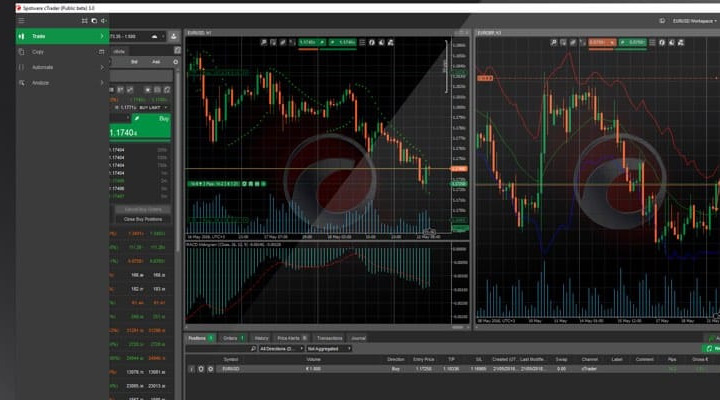
Spotware has released cBroker v9.4, an update to its
back-office solution for brokers. The new version introduces several features
aimed at improving platform management, risk control, and operational
efficiency. This update comes after
the recent launch of cTrader 5.1.
Symbol Split Functionality Introduced
Irina Olyaeva, Product Manager for cBroker, Source: Spotware
One of the key additions is the symbol split functionality.
This feature allows brokers to execute stock splits with positions closed and
reopened in Book B. Future updates are expected to extend this function to Book
A. The “Split Symbol” wizard automates tasks that were previously manual,
reducing complexity in handling stock splits.
cBroker v9.4 also improves account and strategy management.
Brokers can now transfer settings across multiple accounts using a CSV file,
enabling bulk updates. Additionally, strategy tracking has been enhanced with
new performance metrics, including “Total Traded Volume” and “Lifetime
Sub-Accounts,” offering a clearer view of strategy effectiveness.
“With cBroker v9.4, we continue to enhance the
efficiency and control that brokers have over their operations. Our goal is to
simplify complex processes, automate workflows, and provide brokers with the
tools they need to operate seamlessly while maintaining flexibility and
precision,” Irina Olyaeva, Product Manager for cBroker, commented.
Advanced Filtering and Exporting Options
The update includes advanced filtering and exporting
capabilities. Brokers can now exclude specific deal IDs from reports and save
filter settings for future use. Order and position event data can be exported
in XLSX format, simplifying data analysis and record-keeping.
New client management tools have been introduced to improve
database accuracy. A ‘Find Email Mismatches’ feature helps brokers identify
discrepancies between user emails and account emails. The 'Position Open Time'
column has been added to the Deals section, providing more insights into
trading behavior.
Adjusted Trading Conditions and Market Data Management
Trading conditions have also been adjusted. The maximum
stop-loss distance has been increased from 10,000 to 100,000 points, offering
more flexibility for volatile assets. Brokers can also update multiple assets
at once using a CSV file, ensuring more efficient asset management.
Additional improvements include enhanced control over copy
trading membership tracking and market data management. The new “Isolation
Type” column allows brokers to monitor collateral balances for full-membership
white labels. A bulk delete option for feed symbol settings has also been
introduced, streamlining liquidity feed management.
Spotware has released cBroker v9.4, an update to its
back-office solution for brokers. The new version introduces several features
aimed at improving platform management, risk control, and operational
efficiency. This update comes after
the recent launch of cTrader 5.1.
Symbol Split Functionality Introduced
Irina Olyaeva, Product Manager for cBroker, Source: Spotware
One of the key additions is the symbol split functionality.
This feature allows brokers to execute stock splits with positions closed and
reopened in Book B. Future updates are expected to extend this function to Book
A. The “Split Symbol” wizard automates tasks that were previously manual,
reducing complexity in handling stock splits.
cBroker v9.4 also improves account and strategy management.
Brokers can now transfer settings across multiple accounts using a CSV file,
enabling bulk updates. Additionally, strategy tracking has been enhanced with
new performance metrics, including “Total Traded Volume” and “Lifetime
Sub-Accounts,” offering a clearer view of strategy effectiveness.
“With cBroker v9.4, we continue to enhance the
efficiency and control that brokers have over their operations. Our goal is to
simplify complex processes, automate workflows, and provide brokers with the
tools they need to operate seamlessly while maintaining flexibility and
precision,” Irina Olyaeva, Product Manager for cBroker, commented.
Advanced Filtering and Exporting Options
The update includes advanced filtering and exporting
capabilities. Brokers can now exclude specific deal IDs from reports and save
filter settings for future use. Order and position event data can be exported
in XLSX format, simplifying data analysis and record-keeping.
New client management tools have been introduced to improve
database accuracy. A ‘Find Email Mismatches’ feature helps brokers identify
discrepancies between user emails and account emails. The 'Position Open Time'
column has been added to the Deals section, providing more insights into
trading behavior.
Adjusted Trading Conditions and Market Data Management
Trading conditions have also been adjusted. The maximum
stop-loss distance has been increased from 10,000 to 100,000 points, offering
more flexibility for volatile assets. Brokers can also update multiple assets
at once using a CSV file, ensuring more efficient asset management.
Additional improvements include enhanced control over copy
trading membership tracking and market data management. The new “Isolation
Type” column allows brokers to monitor collateral balances for full-membership
white labels. A bulk delete option for feed symbol settings has also been
introduced, streamlining liquidity feed management.
Tareq is a financial writer with 15 years of experience covering global markets. His work spans technical analysis, forex broker reviews, and market sentiment, with a focus on topics relevant to retail traders. He joined Finance Magnates in 2023.
At Finance Magnates, he serves as News Editor, covering retail forex and CFD brokers, cryptocurrency exchanges, fintech firms, and regulatory developments shaping the trading industry. He holds an Honours degree in Information Technology from Anfell College, London.
Education:
Honours degree Information Technology, Anfell College, London
In this video, we review @HolaPrimeMarketsOfficial, a multi-asset forex and CFDs broker offering different account types, trading platforms, and flexible trading conditions.
We cover the broker’s overall offering, including account options, trading environment, platforms like MT4 and MT5, and additional services such as managed accounts and fast withdrawals.
Watch the full video to see if Hola Prime Markets fits your trading needs.
📣 Stay up to date with the latest in finance and trading. Follow Finance Magnates for industry news, insights, and global event coverage.
Connect with us:
🔗 LinkedIn: /financemagnates
👍 Facebook: /financemagnates
📸 Instagram: https://www.instagram.com/financemagnates
🐦 X: https://x.com/financemagnates
🎥 TikTok: https://www.tiktok.com/tag/financemagnates
▶️ YouTube: /@financemagnates_official
#HolaPrime #ForexBroker #CFDTrading #FinanceMagnates #Trading #Forex #BrokerReview
In this video, we review @HolaPrimeMarketsOfficial, a multi-asset forex and CFDs broker offering different account types, trading platforms, and flexible trading conditions.
We cover the broker’s overall offering, including account options, trading environment, platforms like MT4 and MT5, and additional services such as managed accounts and fast withdrawals.
Watch the full video to see if Hola Prime Markets fits your trading needs.
📣 Stay up to date with the latest in finance and trading. Follow Finance Magnates for industry news, insights, and global event coverage.
Connect with us:
🔗 LinkedIn: /financemagnates
👍 Facebook: /financemagnates
📸 Instagram: https://www.instagram.com/financemagnates
🐦 X: https://x.com/financemagnates
🎥 TikTok: https://www.tiktok.com/tag/financemagnates
▶️ YouTube: /@financemagnates_official
#HolaPrime #ForexBroker #CFDTrading #FinanceMagnates #Trading #Forex #BrokerReview
Hola Prime Review: What You Need to Know | Full Breakdown by Finance Magnates
Hola Prime Review: What You Need to Know | Full Breakdown by Finance Magnates
In this video, we review @HolaPrime_Global, a proprietary trading firm offering evaluation programs and performance-based payouts in simulated market environments.
We cover how the challenge model works, including account types, profit splits (up to 95%), trading rules, and what it takes to reach a funded account. You’ll also learn about available platforms like MT4, MT5, cTrader, and more, along with insights into payouts, support, and trading conditions.
Watch the full video to see if Hola Prime fits your trading style.
📣 Stay up to date with the latest in finance and trading. Follow Finance Magnates for industry news, insights, and global event coverage.
Connect with us:
🔗 LinkedIn: /financemagnates
👍 Facebook: /financemagnates
📸 Instagram: https://www.instagram.com/financemagnates
🐦 X: https://x.com/financemagnates
🎥 TikTok: https://www.tiktok.com/tag/financemagnates
▶️ YouTube: /@financemagnates_official
#HolaPrime #PropFirm #Trading #FinanceMagnates #Forex #FuturesTrading #TradingReview #PropFirmReview
In this video, we review @HolaPrime_Global, a proprietary trading firm offering evaluation programs and performance-based payouts in simulated market environments.
We cover how the challenge model works, including account types, profit splits (up to 95%), trading rules, and what it takes to reach a funded account. You’ll also learn about available platforms like MT4, MT5, cTrader, and more, along with insights into payouts, support, and trading conditions.
Watch the full video to see if Hola Prime fits your trading style.
📣 Stay up to date with the latest in finance and trading. Follow Finance Magnates for industry news, insights, and global event coverage.
Connect with us:
🔗 LinkedIn: /financemagnates
👍 Facebook: /financemagnates
📸 Instagram: https://www.instagram.com/financemagnates
🐦 X: https://x.com/financemagnates
🎥 TikTok: https://www.tiktok.com/tag/financemagnates
▶️ YouTube: /@financemagnates_official
#HolaPrime #PropFirm #Trading #FinanceMagnates #Forex #FuturesTrading #TradingReview #PropFirmReview
Axi Winner Spotlight 🏆 | Global Most Innovative Broker 2025 #Innovation #Trading #Fintech #Broker
Axi Winner Spotlight 🏆 | Global Most Innovative Broker 2025 #Innovation #Trading #Fintech #Broker
Axi takes the spotlight at the Finance Magnates Awards, winning Global Most Innovative Broker 2025.
Olivia Xenofontos and Ivanna Openko share how the team will feel: proud, motivated, and ready to keep delivering.
They also describe the night as well-organized, focused, and enjoyable for all.
👉 Be part of FM Awards 2026.
Axi takes the spotlight at the Finance Magnates Awards, winning Global Most Innovative Broker 2025.
Olivia Xenofontos and Ivanna Openko share how the team will feel: proud, motivated, and ready to keep delivering.
They also describe the night as well-organized, focused, and enjoyable for all.
👉 Be part of FM Awards 2026.
Recognition that matters.
Built on transparency.
Driven by the industry.
The Finance Magnates Awards 2026.
Nominations are now open.
🔗 https://awards.financemagnates.com/?utm_source=SM&utm_medium=social&utm_campaign=recognition-matters
Recognition that matters.
Built on transparency.
Driven by the industry.
The Finance Magnates Awards 2026.
Nominations are now open.
🔗 https://awards.financemagnates.com/?utm_source=SM&utm_medium=social&utm_campaign=recognition-matters
Tickmill Winner Spotlight | Broker of the Year 2025 (LATAM) 🏆 | Finance Magnates Awards #Trading
Tickmill Winner Spotlight | Broker of the Year 2025 (LATAM) 🏆 | Finance Magnates Awards #Trading
What helped Tickmill stand out this year?
In this Winner Spotlight, Johnny Khalil, Executive Director at Tickmill Europe, shares how listening closely to clients and delivering strong trading conditions made the difference.
A big thank you to the community whose support continues to drive progress every day.
👉 Think your brand has what it takes? Nominate for the 2026 Finance Magnates Awards: https://awards.financemagnates.com/#nominate
What helped Tickmill stand out this year?
In this Winner Spotlight, Johnny Khalil, Executive Director at Tickmill Europe, shares how listening closely to clients and delivering strong trading conditions made the difference.
A big thank you to the community whose support continues to drive progress every day.
👉 Think your brand has what it takes? Nominate for the 2026 Finance Magnates Awards: https://awards.financemagnates.com/#nominate